タッチノーテーションとは
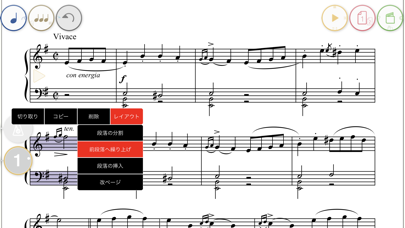
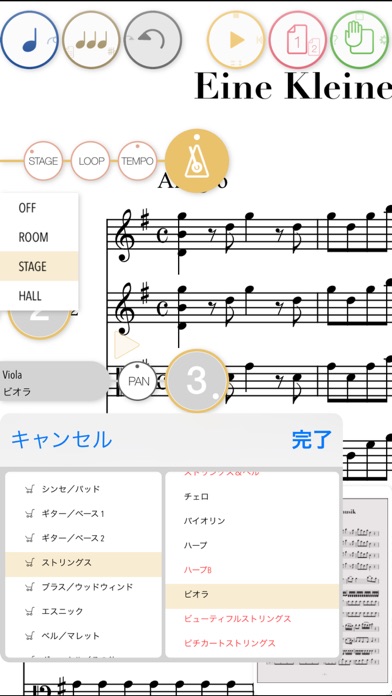
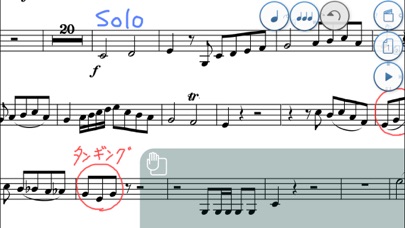
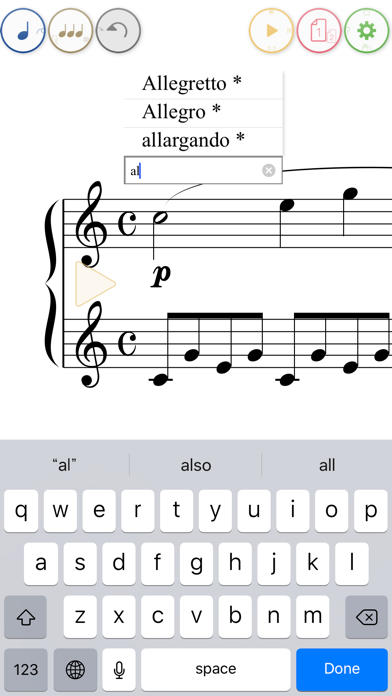
タッチノーテーションは、指やApple Pencilで紙に書くような感覚で楽譜が作成できる革新的な手書き楽譜アプリです。描いた軌跡が瞬時に美しい楽譜に変換され、30種類の厳選された楽器音で正確に演奏されます。App Store Best of 2014に選ばれた、音楽制作をより直感的で楽しくしてくれるアプリです。
口コミとレビュー
-
I haven’t been this excited about notation software since I started using Finale v1.0. Yes, it has it’s quirks. Yes, it has it’s flaws. I really don’t care. It’s still better (for me) than requiring me to do several different actions for each note, or rely on my not-so-good timing at a keyboard.
-
I’ve always hated entering music in Finale. If I write out something for the music theory classes I teach, I often prefer to write it out by hand over Finale. In no time, I got to a point with this app, that I can teach music theory concepts while writing out examples real time on this app, while sending it to Apple TV, and then immediately play what we’ve notated for my students.
-
It’s like the best thing that happened to my iPad after OnSong, Forescore and the new notes app. A simple app by Kawai, a great product. Unlike the Microsoft one this writes everything out straight away when you input it.
多くのユーザーがタッチノーテーションの革新的なアプローチに魅了されています。特に音楽教育に携わる人や作曲家からは、従来の楽譜ソフトとは比べ物にならない使いやすさと効率性が評価されています。Finaleなどの高機能ソフトよりも直感的に楽譜が書け、リアルタイムで演奏確認できる点は本当に優れています。紙に書く自然な感覚でデジタル楽譜が作成できるというコンセプトが、多くのミュージシャンや音楽教育者の心を掴んでいるようです。
-
This app is a sleeper, so useful, especially for leadsheets. the only one that I know of that you can write charts with your finger or a stylus and it will show up as perfect notation. NO DRAG AND DROP NOTES, which is tedious. Copying and pasting notes, bars, even whole sections of the song is so easy.
-
Very frustrating at times, but over all this app is very well worth the price for all the features it offers. Very flexible with what and how you write. Gesture recognition is intuitive and the playback function is great. Works well with Apple Pencil.
-
If you are musician this little program provides a handy way to sketch ideas and if pressed, to turn out a quick composition, part, or lead sheet. It takes a few minutes to get the basic concept but once you have the general idea it is relatively intuitive.
タッチノーテーションの機能性について、ユーザーからは高い評価が寄せられています。特にコピー&ペースト機能の充実さが好評で、小節単位での複製やセクション全体のコピーが簡単に行える点が評価されています。リードシートの作成に最適という声も多く、プロフェッショナルから趣味のミュージシャンまで幅広い層に支持されています。最初は習得に時間がかかるかもしれませんが、基本を理解すればかなり直感的に操作できるようになるという点が強調されています。
-
Kawai’s gestures are totally natural. They did a fantastic job designing a notation package that was willing to work with me instead of making me learn how to work with it.
-
Use spacer tool (three 1/4 notes picture top left) to space out correctly. Set-up the double tap auto zoom to fit a bar more comfortably than the 800%. Take time to play around learn how they want you to input symbols, there aren’t that many!
-
Great for writing out your parts. App doesn’t collect your data, the price is reasonable and the learning curve isn’t that hard, especially if you’ve used other notation programs in the past.
操作性と使いやすさについても、ユーザーから高く評価されています。何より素晴らしいのは、カワイが設計した手書き入力の仕組みが非常に自然で、ユーザーが複雑な操作を学ぶのではなく、アプリがユーザーに合わせてくれるという設計哲学です。複雑に見える機能も、実は数え切れるほどしかない記号入力ルールを学ぶだけで、すぐに使いこなせるようになります。また、適正な価格設定とプライバシー保護の姿勢も評価されており、他の楽譜ソフトと比べると圧倒的に敷居が低いという印象を受けます。
-
Great sounding orchestral voices even at the entry level. Kawai is heading in the right direction with this app.
-
the only one of its kind wit handwriting recognition to music notation AFAIK. The only one that I know of that you can write charts with your finger or a stylus and it will show up as perfect notation.
-
I can just write it out with my hand and even better, edit it without destroying three erasers and the paper.
グラフィックと演出面に関しても、ユーザーから好意的な評判が聞かれます。手書きで描いた軌跡がリアルタイムで美しい楽譜に清書される様子は、見ていて本当に感動的です。30種類の厳選された楽器音色による正確な演奏再現も、制作した楽譜の完成度を確認する上で極めて重要な機能となっています。紙と鉛筆を使うような自然な感覚で楽譜が作成でき、従来の手書き譜面と違って消しゴムで何度も消す手間がかからないという利便性も、ユーザーの満足度に大きく貢献しているようです。
タッチノーテーションはおすすめ?
タッチノーテーションは、本当に音楽制作をしている人なら検討する価値のあるアプリです。
何より素晴らしいのは、従来の楽譜作成ソフトとは全く異なるアプローチを取っているという点です。パレットから音符を選んで貼り付けるという退屈な作業ではなく、紙に書くように直感的に楽譜が作成できます。Apple Pencilとの相性も良く、指での入力にも対応しているので、自分のスタイルに合わせて使い分けられます。
ただし、完璧ではない点もあります。ユーザーレビューを見ると、記号認識がたまに失敗することがあったり、アプリがクラッシュしたりという報告も見られます。また、開発者によるアップデートが頻繁ではないという指摘もあります。しかし、こうした課題があっても、多くのユーザーが「価格に見合う価値がある」と評価しており、学習曲線も比較的緩やかです。
特におすすめなのは、リードシート作成、音楽教育、ラフスケッチの制作などです。プロの作曲家や音楽教育者からも高く評価されているアプリなので、真剣に楽譜制作をしたいなら試す価値は十分にあります。
編集部のまとめ
タッチノーテーションのユーザーレビューを見ると、このアプリは確実に一定の層から強い支持を受けていることがわかります。
最大の特徴は、手書き楽譜という革新的なコンセプトを見事に実現していることです。App Store Best of 2014に選ばれたのも納得できる完成度を持っており、特に直感的な操作性とコピー&ペースト機能の優秀さが評価されています。
一方で、記号認識の精度がたまに落ちることや、アプリのクラッシュ、不具合の修正が遅いという課題も報告されています。しかし、これらの課題があっても、全体的には「価格に見合う価値がある」という評価が圧倒的です。
音楽教育に携わる人、作曲家、ミュージシャンなど、楽譜を扱う人にとっては検討する価値のあるアプリと言えます。
タッチノーテーションの口コミ・レビューについてまとめました
タッチノーテーションは、手書き楽譜という革新的なコンセプトで多くのミュージシャンや音楽教育者から支持されているアプリです。
直感的な操作性と優れた機能が評価される一方で、認識精度やアップデート頻度に改善の余地があります。それでも全体的には「価格に見合う価値がある」という評価が大多数です。

[appcard id=”890358046″]